Build mini-apps that run in the car
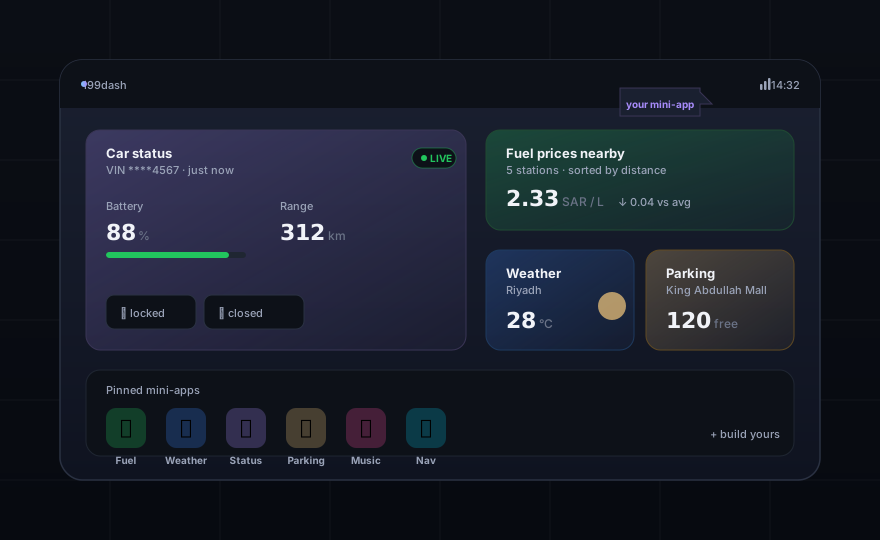
i99dash hosts third-party HTML / JS / CSS bundles on car head-units. Read context, call your backend, ship to a public catalog. Five minutes from init to live.
What you get out of the box
The SDK is small on purpose. Every surface earned its place by removing a class of bug.
Five-minute path to live
pnpm dlx scaffolds, dev-server boots in 300 ms with a fake host. Validate, login, publish — all CLI.
Any framework that builds static
Next.js (output: export), Nuxt, Vite, Svelte, plain HTML — all work. The host loads bytes, not your stack.
Privacy- and safety-first
No actuators, no telemetry from the SDK. Privileged ops gated by user consent + 30-day session caps.
Live car-status streaming
Subscribe to door / battery / lock state with one call. Backpressure + page-visibility handled for you.
Test like normal code
MiniAppClient.withBridge(fake) is the only seam. No jsdom, no platform channels — runs in pure Node.
Auto-generated API reference
Every public type, class, and exit code rendered from JSDoc. Edit the SDK; the docs follow within minutes.
Three commands to a live mini-app
No accounts, no DNS, no backend required to start. The dev-server simulates the host so you ship on day one.
- 1Scaffold with the CLI — vanilla, React, or Vue.
- 2
pnpm devboots a control panel for driving / device ID / locale / theme. - 3
pnpm publishto the catalog (or beta track for a small cohort first).
$ pnpm dlx i99dash init my-app
   ✓ created  manifest.json
   ✓ created  sdk.config.json
   ✓ created  src/index.html
   ✓ created  mocks/fuel-stations.GET.json
  → cd my-app && pnpm dev

$ pnpm dev
✓  sdk-dev-server on http://127.0.0.1:5173
✓  control panel  http://127.0.0.1:5173/_sdk/ui

$ pnpm publish
✓  manifest validated
✓  bundle uploaded (28.4 KB)
✓  app live in the catalog ▸ store/my-app
One bridge between your code and the world
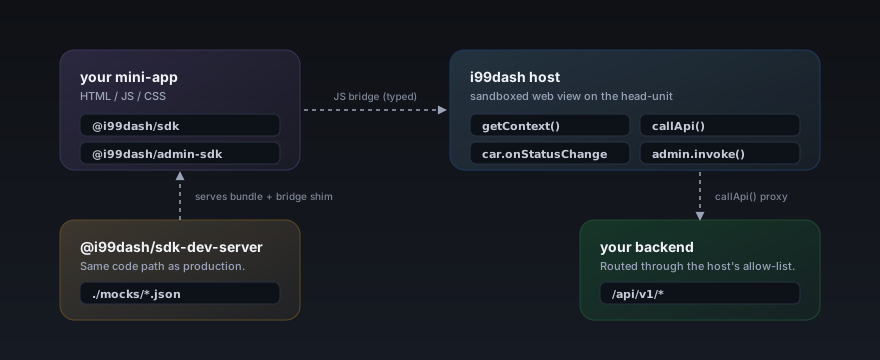
Your app never calls window.location or fetch() directly. Every input and output crosses one typed seam — testable, mockable, stable.
Built for coding assistants, too
The site exposes /llms.txt and a Streamable-HTTP MCP server with structured search and per-page fetch. Most coding assistants discover this automatically.
$ claude mcp add --transport http \
    i99dash-docs \
    https://docs.i99dash.app/api/mcp

✓ server registered
  tools: search_docs, get_doc,
         list_packages, list_symbols,
         list_sections
Ready to ship a mini-app?
Start with the quickstart. Hit a wall? The troubleshooting page covers every issue we've seen in the wild.